Use vehicle space better
Visualise the planned fill before allocating another truck or shipment.
Plan truck, container and pallet loads in 3D. Validate fit, balance and freight metrics, then turn the plan into operational handoff and reporting.
No credit card required for the core simulator.
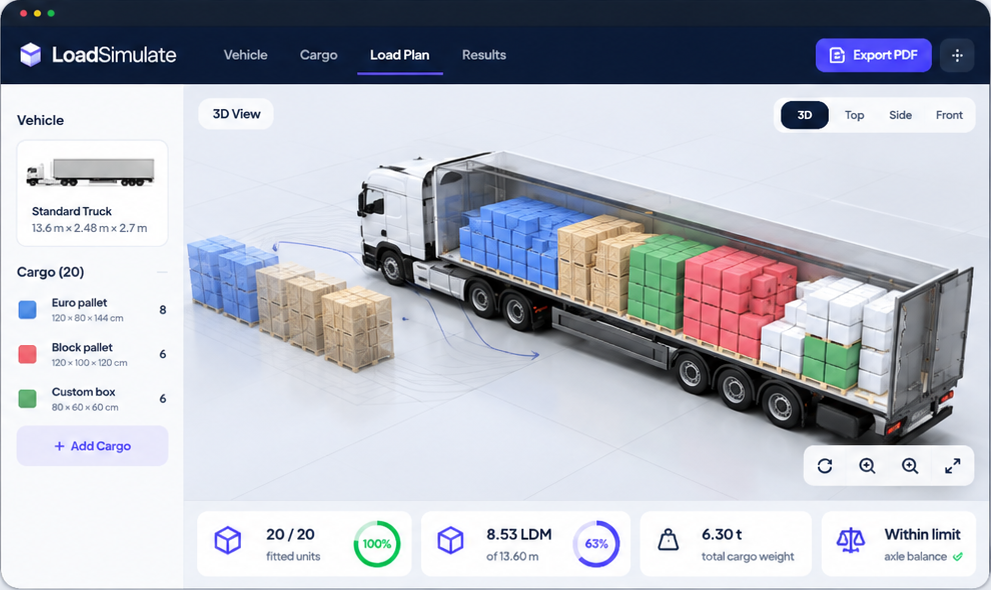
Visualise the planned fill before allocating another truck or shipment.
Give warehouse and transport teams a shared plan instead of a spreadsheet guess.
Use axle and load-distribution indicators as an early planning check.
Compare transport emissions while planning the shipment.
Move from a visible load plan to an operational record without losing the context behind the shipment.
Create 3D truck, container or pallet loading plans with cargo, vehicle and delivery order.
Review fit, payload, axle distribution, centre of gravity, LDM, CBM and estimated CO₂e.
Create a professional PDF, loading instructions and QR access for warehouse and transport teams.
Review completed shipment activity by period, route, country, pallets, weight and estimated CO₂e.
Keep the operational history behind each plan visible when the work moves from simulation to shipment review.
Generate clear, branded outputs for planning, warehouse handoff and the shipment record that follows.
Document cargo, vehicle utilization, 3D layout, axle balance, route and estimated CO₂ in one professional report.
Give warehouse teams a clear loading sequence, unload order and instant access to the read-only plan via QR.
Plan free. Upgrade when you need professional outputs and operational handoff.
Try the fundamental planning experience at no cost. Upgrade only when you need cloud history, sharing, advanced planning options and professional reports.
Use a sample load to see the full workflow, or add your own cargo and continue from the form below.
Sets the standard dimensions and weight. Quantity, stop and colour stay yours.
Planning aid only. Confirm final route restrictions, permits and local rules before dispatch.
Estimated using generic transport emission factors. Actual emissions may vary depending on vehicle, load factor, fuel, route and operating conditions.
Estimated from straight-line distance with transport-mode coefficients; this is not live road or navigation routing.
Route distance: Estimated from great-circle distance between selected hubs and the current transport-mode coefficient; it is not live GPS routing.
CO₂e: Fitted cargo weight × estimated distance × the selected mode factor (road 0.062, rail 0.022, sea 0.018, air 0.602 kg/t·km); planning estimate only.
Axle balance: Indicative distribution based on cargo centre of mass and configured vehicle geometry and tare assumptions; not a certified weighing result.
Uses the current simulation; it is not certified, verified or a live-navigation result.
Distance, fuel consumption and emission factor use default data.
Leave unknown fields at their default. These settings affect only this separate estimate.
Vehicle, fuel and factor:
Factor source:
Scope:
Unit: · Dataset version/date:
Data confidence:
Input basis:
Assumptions:
Methodology references only: ISO 14083:2023 · European Commission CountEmissionsEU · European Commission JEC WTW v5 (2020).
Plan free. Upgrade when you need professional outputs and operational handoff.
No artificial simulation quota in Free; Pro unlocks the professional ways to retain, share and hand off the result.
3D LOAD PLANNING WORKSPACE
Use the cargo loader simulator to plan trucks and containers with pallets, boxes, coils, reels, drums and big bags. Review volume fill, weight fill, LDM, fitted and unfitted cargo, indicative axle distribution, centre of gravity and estimated transport CO₂e from the same shipment context.
Equipment, cargo dimensions, quantity, unit weight, delivery order and route context.
3D placement, fitted/unfitted units, volume and payload utilisation, LDM, axle distribution and estimated CO₂e.
A transport planner might start with a 13.6 m curtain-side trailer containing Euro pallets and cartons for multiple delivery stops, such as 24 Euro pallets plus 6 cartons. Enter the actual shipment data and use the result to review fit, capacity, loading order and indicative axle distribution; the example does not assume a fixed outcome.
Plan the shipment, check fit and capacity, review load balance, then save a scenario when the workflow needs a record. Pro users can prepare PDF reports and loading instructions, including QR access for the warehouse, and continue with the Reporting Portal for completed shipment summaries.
Calculations depend on supplied inputs. Vehicle, cargo securing, weighing, route and legal checks remain the operator’s responsibility. For supporting guidance, see the truck capacity guide, container capacity guide, LDM guide and LDM calculator.
You can plan supported pallets, boxes, coils, reels, drums and big bags with their dimensions, quantity and weight.
Yes. Select the vehicle or container configuration that represents the planned shipment and inspect it in 3D.
Yes. The workspace separates fitted and unfitted units so the remainder stays visible.
Yes. Indicative axle distribution and centre-of-gravity context are shown as planning aids.
Pro workflows support saved scenarios and sharing so teams can review the same plan.
Pro users can prepare professional reports and loading instructions for operational hand-off.
Build a stable pallet pattern, inspect it in 3D, then use it in your vehicle load plan.
BOX TO PALLET PLANNING
Use the Box to Pallet calculator to test how cartons may be arranged on a selected pallet before warehouse loading. The tool keeps the actual inputs visible and shows the proposed pattern in 3D.
For a planning example, enter cartons measuring 40 × 30 × 22 cm, quantity 60, on a Euro pallet with a 180 cm maximum height and 1,000 kg maximum weight. The example explains which constraints matter without assuming a fitted result.
Review fitted and unfitted boxes, pallet height, pallet weight, base coverage, safety checks and the 3D pattern. These outputs support a handling decision; they do not certify packaging strength or stability.
After the pallet result, use Add this pallet to vehicle plan to place it in a truck or container workflow and continue with fit, payload and indicative axle review.
It depends on box dimensions, orientation, height, weight and stacking rules. The 3D plan shows the proposed arrangement.
Yes. Enter the maximum height that applies to the planned pallet.
Yes. Enter the maximum weight limit and review the planned pallet weight against it.
Yes. Fitted and unfitted quantities remain visible after the plan is calculated.
No. Packaging strength, wrapping, strapping, overhang and real-world stability must be verified by the operator.
Yes. Add the pallet to the vehicle plan and continue with vehicle-level fit, payload and placement review.
Your previously saved simulation plans.
Completed shipment reporting from your saved scenarios.
Reporting is based on available shipment records. Missing values are not treated as zero.
Estimated Transport CO₂e
Planning estimate based on available shipment data.
| Shipment Date | Scenario Name | Origin | Destination | Transport Mode | Vehicle | Units | Pallets | Cargo Weight | Distance | Tonne-km | Estimated CO₂e | ISO WTW / TTW | Status |
|---|
ISO 14083-aligned default-data planning estimate.
LoadSimulate helps logistics teams turn shipment details into a visible, practical plan before dispatch. It is a planning tool; final vehicle, securing and legal checks remain the operator’s responsibility.
See the cargo plan inside the selected vehicle before it reaches the loading bay.
Compare estimated transport impact while you plan a shipment and its route.
Use load-distribution indicators as an early planning check before dispatch.
Check published country packs, seasonal restrictions and source links for supported corridors.
Plan custom pallets, alternating layers and mixed carton stacks with richer controls.
Save cloud scenarios, share plans and create professional PDF reports for operations.
No artificial simulation quota in Free; Pro unlocks the professional ways to retain, share and hand off the result.
The Free plan proves the loading value. Pro turns that result into a repeatable professional workflow for your team, driver or customer.
For testing a load, checking space and seeing a clearer plan before dispatch.
7 days free · €0 today · then €19/month · cancel anytime
For recurring transport work that must be retained, shared and executed professionally.
Payment method required for the trial
≈ 13.25 €/month
Save €69/year (30%)
€159 billed today · annual subscription
Best for regular logistics teams. Get the full Pro experience for €159/year and save 30%.
Route Compliance is currently a beta planning aid. It does not replace permits, official route planning, vehicle securing checks or legal advice.
Manage your personal, company and account settings.
Your details are private and visible only to you.
Used automatically in your simulation and PDF report details.
Used on Professional Reports and Loading Instructions.
Use a strong password containing at least 6 characters and one number.
Loading Instruction
-
-
-
www.loadsimulate.com
Planned cargo
-
Placed
-
Volume fill
-
Weight fill
-
The loading order goes from the cab side to the door side. Loads for the last delivery stop are loaded first; loads for the first delivery stop remain nearest to the door. Confirm final securing and legal checks before dispatch.
| # | Cargo | Zone | Qty | Unload/Drop Order | Notes |
|---|
Not included in load plan
Follow these steps from first loaded to last loaded. The final delivery is nearest the cab.
Cabin ← → Door
Before departure
Verify quantity, cargo securing and vehicle limits before dispatch.
Planning note
This is a planning aid. The operator remains responsible for final loading, securing and legal checks.
Load Planning Report
Generated
LoadSimulate
Pallet dimensions include the deck allowance. Review safety status before dispatch.
| Cargo / item | Qty | Dimensions | Unit weight | Total weight | Status |
|---|
Not included in load plan
- (-)
-
-
-
-
-
-
-